Inspecting a DIANA model (with observations)
This example shows how on can download a DIANA model and look at some results (including observations).
For more details on DIANA and more DIANA standard models see
[1]:
import urllib.request
import tarfile

# module to read a ProDimo model
import prodimopy.read as pread
# module for plotting a ProDiMo model
import prodimopy.plot as pplot

import matplotlib.pyplot as plt

# load the default style for the plots
pplot.load_style()

plt.rcParams['figure.dpi'] = 100 # set the resolution of the plots, useful to scale the figure size in a notebook
INFO: Load prodimopy mplstyle from package.
Download and read in a DIANA Standard model
[2]:
# Download and extract the Model tarfile into a Directory ... this might take a while ... be patient
target="DMTau"
modeltarfile=urllib.request.urlretrieve("https://prodimo.iwf.oeaw.ac.at/media/prodimodata/DIANAstandard/"+target+"_ModelOutput.tgz")[0]
# this includes also the collected observational data
modelSetup=urllib.request.urlretrieve("https://prodimo.iwf.oeaw.ac.at/media/prodimodata/DIANAstandard/"+target+"_ModelSetup.tgz")[0]
tarfile.open(modeltarfile).extractall(target,filter=None)
tarfile.open(modelSetup).extractall(target,filter=None)


# now read the model data with prodimopy
model=pread.read_prodimo(target)
/tmp/ipykernel_3346264/3878643.py:6: DeprecationWarning: Python 3.14 will, by default, filter extracted tar archives and reject files or modify their metadata. Use the filter argument to control this behavior.
  tarfile.open(modeltarfile).extractall(target,filter=None)
/tmp/ipykernel_3346264/3878643.py:7: DeprecationWarning: Python 3.14 will, by default, filter extracted tar archives and reject files or modify their metadata. Use the filter argument to control this behavior.
  tarfile.open(modelSetup).extractall(target,filter=None)
READ: Reading File:  DMTau/ProDiMo.out  ...
READ: Reading File:  DMTau/Species.out  ...
READ: Reading File:  DMTau/FlineEstimates.out  ...
READ: Reading File:  DMTau/Elements.out  ...
READ: Reading File:  DMTau/dust_opac.out  ...
WARN: Could not open DMTau/dust_sigmaa.out!
READ: Reading File:  DMTau/StarSpectrum.out  ...
READ: Reading File:  DMTau/line_flux.out  ...
READ: Reading File:  DMTau/SED.out  ...
READ: Reading File:  DMTau/SEDana.out  ...
READ: Reading File:  DMTau/SEDobs.dat  ...
READ: Reading File:  DMTau/SpitzerIRSspec.dat  ...
READ: Reading File:  DMTau/SPIREspec.dat  ...
READ: Reading File:  DMTau/extinct.dat  ...
READ: Reading File:  DMTau/LINEobs.dat  ...
READ: Reading File:  DMTau/LineProfile_CO_21_cen.dat  ...
READ: Reading File:  DMTau/LineProfile_HCOp_32_cen.dat  ...
READ: Reading File:  DMTau/image.out  ...
READ: Reading File:  DMTau/Parameter.out  ...
INFO: Reading time:  1.93 s
Plot the data within the notebook
[3]:
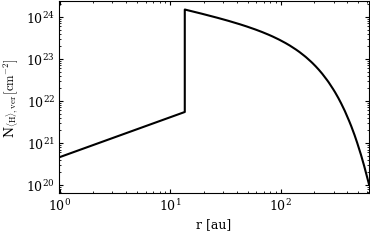
pp=pplot.Plot(None)

fig=pp.plot_NH(model)
# you can still save the figure to a pdf file if you want
fig.savefig("plotNH.pdf")
PLOT: plot_NH ...
OMP: Warning #182: OMP_STACKSIZE: ignored because GOMP_STACKSIZE has been defined
[4]:
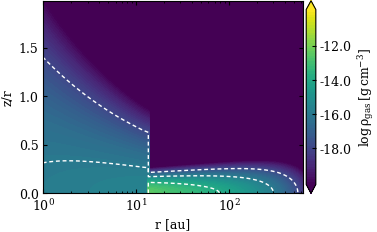
# Show the structure of the model
fig=pp.plot_cont(model,model.rhog,label="rhog",zlim=[1.e-20,1.e-10],extend="both")
PLOT: plot_cont ...
Showing some observations
[5]:
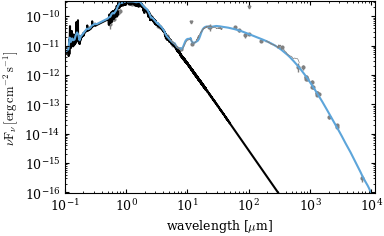
# SED with photometry and Spitzer spectrum
fig=pp.plot_sed(model,sedObs=model.sedObs)
PLOT: plot_sed ...
[6]:
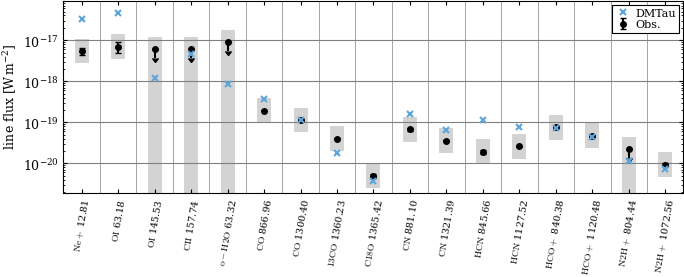
# line fluxes, from the line radiative transfer, also show the observational data
fig=pp.plot_lines(model,[[line.ident,line.wl] for line in model.lines],lineObs=model.lineObs,useLineEstimate=False)
PLOT: plot_lines ...
PLOT: plot_lines ...
[7]:
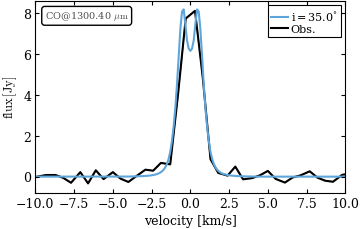
# some line profile
fig=pp.plot_lineprofile(model,ident="CO",wl=1300,lineObs=model.lineObs,xlim=[-10,10])
PLOT: plot_line_profile ...
Extract some data and put it into a file
An example for extracting some data from the model and write it to a text file. Which can be then used for other purposes.
[8]:
import numpy

# get the dust temperature in the midplane
tdust=model.td[:,0]
# get the r coordinate in the midplane
r=model.x[:,0]

numpy.savetxt(target+"tmid.txt",numpy.column_stack((r,tdust)),header="midplane dust temperature as a function of radius\n r [au] Tdust [K]")